










On this page · 10 sections
- Why can nobody tell you where the time goes?
- Why not use timesheets, a survey or tracking software?
- What should you count?
- Who should you sit with?
- How do you turn it into hours and pounds?
- What should the map look like at the end?
- What does mapping cost, and when is it not worth doing?
- What to do this month
- Questions founders ask
- Sources
You have doubled revenue and nearly doubled the team. Everyone is busy, your best people are stretched, and when you ask where the week goes, nobody can tell you. The work that eats it is not one big job you could point at. It is a few hours of copying, chasing, checking and re-keying in every team, and no system records it.
The scale is easy to underestimate. Microsoft's telemetry, published in June 2025, shows the average Microsoft 365 user receiving 117 emails and 153 Teams messages a day and being interrupted every two minutes. Chasing unpaid invoices alone takes 86 staff hours a year in each UK business affected by late payment, and 324 hours in a medium-sized one, according to research for the Department for Business and Trade.
You do not need a time-and-motion study to find your own figure. This guide shows how to map routine work department by department: what to count, who to sit with, how to turn it into hours and pounds, and what the finished map should look like.
Why can nobody tell you where the time goes?
Because routine work is spread thinly across every team, and none of your systems records it. A timesheet has a code for a client or a project. It has no code for copying an order from an email into the finance system, or for chasing a colleague for a number.
Software firms have tried to size it. Asana's Anatomy of Work Index puts "work about work", such as chasing updates and switching between tools, at 60% of a knowledge worker's time. Asana sells work management software, so treat that as a seller's figure. The direction matches what we see: in a firm with £5m to £100m in sales, the routine work is a few hours of everyone's week, and nobody sees the total.
This matters more now that firms are turning to AI to fix it. The Office for National Statistics reported in July 2026 that about 35% of UK businesses with ten or more employees use AI, up from about 12% in late 2023, and that improving business operations is the most common purpose. Its earlier analysis found that the most commonly reported barriers were difficulty identifying business use cases, cost and a lack of expertise. A map of where the time goes is how you find the use cases.
Why not use timesheets, a survey or tracking software?
Each one measures something, but not the thing you need, which is a list of repeated tasks with a volume and a time against each.
| Method | What it tells you | Where it falls short |
|---|---|---|
| Timesheets | Hours by client, matter or project | Routine work hides inside "admin" or inside billable codes |
| A staff survey | How busy people feel, and what annoys them | It collects opinions and complaints, not a list of tasks with volumes |
| Tracking software | Which applications are open, and for how long | It cannot tell useful work from re-keying, and it damages trust |
| A time-and-motion study | Exact timings from an observer with a stopwatch | Slow and costly for office work that changes from hour to hour |
| Task count and sitting with the team | Every repeated task, its volume and its minutes | Estimates, not measurements, so the totals need checking |
The government's own trials show why minutes alone mislead. In a cross-government experiment with 20,000 staff, users of Microsoft 365 Copilot reported saving an average of 26 minutes a day. The Department for Business and Trade's evaluation of its own 1,000 licences, dated August 2025, "did not find robust evidence to suggest that time savings are leading to improved productivity", though it adds that productivity was not a key aim of the study. Minutes saved on a task tell you little unless you know what the task was for and what happened to the time.
Tracking software carries a legal burden as well. The Information Commissioner's Office guidance on monitoring workers says: "You must be clear about your purpose and select the least intrusive means to achieve it." If your purpose is to find routine work, asking people and watching the work with their agreement is less intrusive than software that watches them.
What should you count?
Count tasks, not time. A task is any job that repeats: it has a trigger, a set of steps and an end. For each one, write down seven things.
- What starts it: an email, a signed contract, a date in the month.
- Who does it, and in which team.
- Which systems it touches, and what is copied between them by hand.
- How many times it happens in a week or a month.
- How many minutes one takes when nothing goes wrong.
- How often something does go wrong, and what happens then.
- Whether it follows a rule you could write down, or needs judgement.
Four verbs find most of it: copying, chasing, checking and re-keying. Add reporting, because somebody in most firms builds the weekly or monthly numbers by hand.
Follow the work in the order a client meets it, so nothing falls between departments. Our example maps use seven stages: attract, take on, do the work, bill, get paid, keep, and run the firm. The gaps between stages matter most, because a handover is where work waits and gets typed twice.
Leave out the skilled work. You are not timing how long a lawyer takes to advise or an engineer to design. You are counting what surrounds that work.
Who should you sit with?
The people who do the task, at their desks, while they do it. A manager will describe the process as it was designed. The person doing it will show you the spreadsheet nobody else knows about.
In our experience three choices make the sessions useful:
- Two people in each role. Pick the newest, who still follows the written process, and the most experienced, who knows every workaround.
- Show, do not tell. Ask them to do a real one while you watch: one enquiry, one new client, one invoice, followed from start to finish.
- Thirty to sixty minutes each. Longer and you are in the way; shorter and you see only the tidy version.
Tell the team why you are doing it before you start. The map is about the work, not about individuals, and no names go on it. People are candid about wasted effort once they believe the aim is to take it off them.
How do you turn it into hours and pounds?
Multiply volume by minutes for each task, add the tasks up by team, and price the hours at what the role really costs you. The method below works for one team in a few weeks.
Step 1: List the teams and the stages
Draw the seven stages across a page and write each team under the stage it works in. Note the headcount beside each. This is the skeleton of the map.
Step 2: Sit with each team and list the routine tasks
Use the seven questions above. Most teams have more routine tasks than they expect. Write each in plain words a stranger would follow: "copy new client details from the signed form into the practice system".
Step 3: Count volume and minutes
Take the volume from a system where you can: invoices raised, tickets closed, new clients opened. Take the minutes from what you watched, not from what people guess. A task done 40 times a week at 12 minutes is eight hours a week.
Step 4: Turn hours into pounds
Use the real salary for the role where you have it. As a benchmark, the ONS Annual Survey of Hours and Earnings puts median full-time pay at £40,911 a year, or £20.81 an hour, in April 2026. Employers then pay National Insurance at 15% on earnings above £5,000 (GOV.UK) and at least 3% into a workplace pension (GOV.UK).
For example, that median employee costs about £47,000 a year in salary, employer National Insurance and minimum pension. Over 52 weeks of 37.5 hours, that is about £24 for each paid hour, before holidays, software, desk space and management. So 20 routine hours a week cost about £25,000 a year. We set out the full cost of a hire in in-house SDR or outsourced outbound and fractional CMO, agency or in-house.
Step 5: Mark what a system could take on
Go down the list and mark each task. If it follows a rule you can write down, a system could probably do it. If it needs judgement, a relationship or a signature, it stays with a person. Anything that reaches a customer or moves money should keep a person's approval even when a system does the preparation.
Step 6: Check the totals with the team
Add up the hours for each person's role. If the routine tasks come to more than their contracted week, an estimate is wrong. Show the team the list and ask what is missing. They will correct it in ten minutes.
What should the map look like at the end?
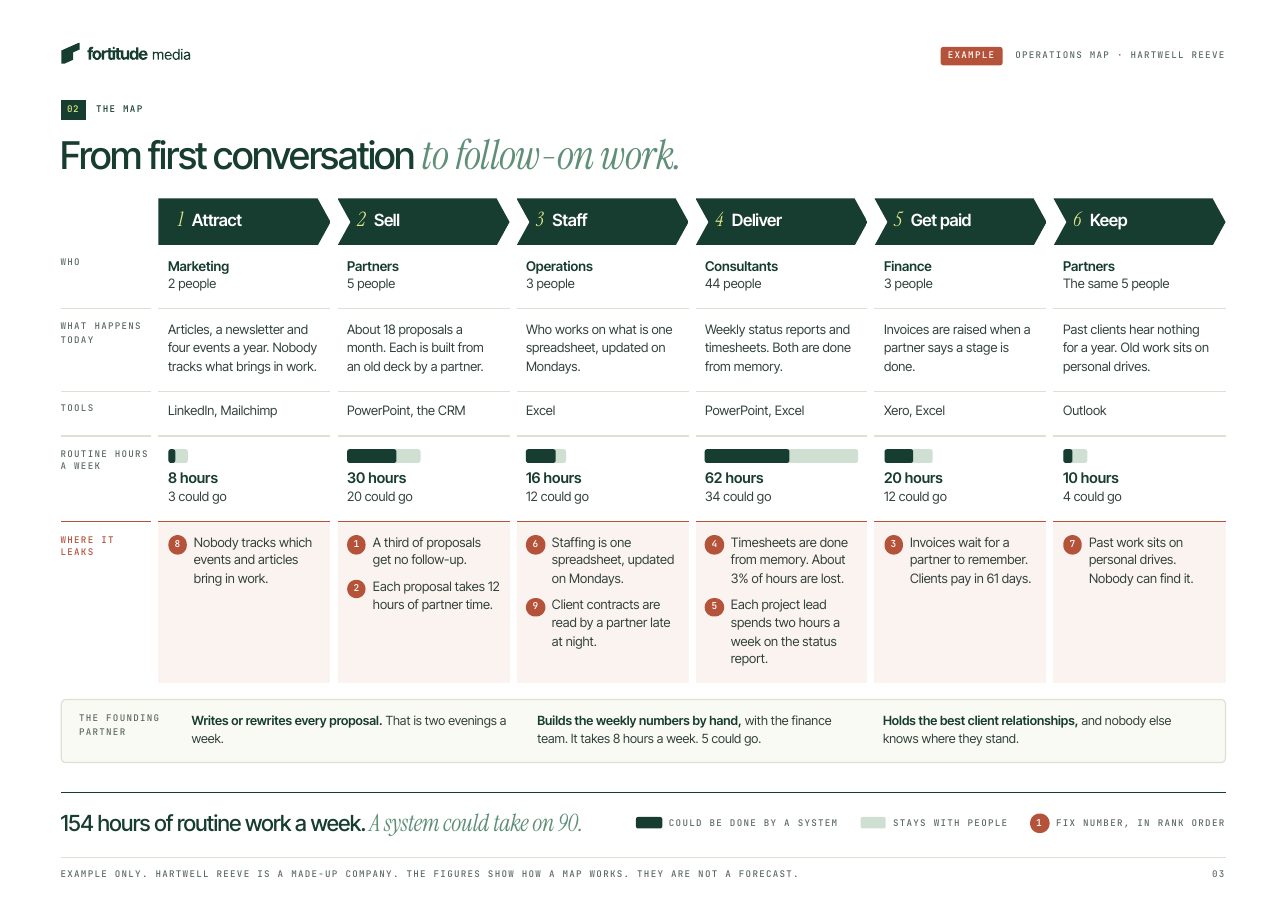
One page, with a row for each team: how many routine hours it spends a week, how many a system could take on, and what stays with people. Behind it sits the task list, so every number can be traced to a task somebody watched.
This is the example from our Business Operating System page. Penhallow Clarke is a made-up commercial law firm with £14m in sales and 120 people. The figures show how a map works. They are not a forecast.
| Stage | Team | Routine hours a week | A system could take on |
|---|---|---|---|
| Attract | Marketing, 3 people | 8 | 5 |
| Take on | Client onboarding, 6 people | 54 | 38 |
| Do the work | Fee earners and secretaries, 86 people | 120 | 64 |
| Bill | Billing team, 5 people | 60 | 40 |
| Get paid | Credit control, 3 people | 28 | 14 |
| Keep | Partners, 14 people | 12 | 4 |
| Run the firm | Managing partner, weekly numbers by hand | 8 | 5 |
| Total | 290 | 170 |
A map like this shows the total, which nobody had seen. It shows where the routine work is concentrated: here, taking on clients and billing them. And it separates what a system could do from what stays with people, so the conversation with the team starts from what they keep.
The map is the start of a plan, not the plan. The next question is which task to take first, which we cover in which jobs to automate first.
What does mapping cost, and when is it not worth doing?
Doing it yourself costs time: somebody senior enough to be told the truth, for a few weeks, for each team. Paying for it costs a fixed fee. Our Operations Map and plan is £2,999 for one team, function or division and takes about three weeks. For the whole business it is £7,500 to £15,000, priced by size and fixed before we start. Both are on what it costs. The map and the plan are yours to keep, and you can build from them with us, with your own team, or not at all.
We automated our own firm before we sold any of this, and how we run Fortitude shows the result, area by area.
A map is not always worth doing. Skip it, or delay it, when:
- You already know the one job that hurts. If everyone agrees month-end invoicing is the problem, fix that and map the rest later.
- A core system is about to change. Map after the new finance or practice system is in, or you will map work that is about to disappear.
- The team is very small. Three people in one room can list their routine work on a whiteboard in an afternoon.
- Nobody will act on it. A map with no owner and no budget behind it is a report, and you have enough of those.
If you do act on it, compare the two bills side by side. The cost of automating a department against hiring works through the sums.
What to do this month
- Pick one team where people complain most about admin, and tell them what you are doing and why.
- Sit with two people for an hour each and list every task that repeats, using the seven questions.
- Pull the volumes from your systems, multiply by the minutes you watched, and total the hours a week.
- Price the hours at the real cost of the role, and mark each task as rule-following or judgement.
- Put it on one page, show the team, and correct it.
- Decide who owns the next step before you map a second team.
If you would like a second pair of eyes on where your firm's routine hours sit, book a conversation: 30 minutes with a founder, at no charge.
Frequently asked questions
How long does it take to map one team?
A few weeks from first session to a one-page map. Ours takes about three weeks for one team, function or division. Most of the elapsed time is finding hours in people's diaries, not the sessions themselves.
Will the team feel they are being watched?
Not if you tell them first. Explain that you are counting tasks, that no names go on the map, and that the aim is to take routine work off them. The ICO's guidance expects an employer to be clear about its purpose and to pick the least intrusive way to meet it, which is one more reason to ask and observe openly instead of installing software.
Do we need time-tracking software to do this?
No. Software shows which applications were open, not which tasks were done or why. A task list with volumes from your own systems and minutes from watching the work gives you a better answer in less time.
How accurate does the map need to be?
Accurate enough to rank the teams and the tasks, and no more. You are deciding where to start, not setting a budget to the pound. If two people in the same role give you estimates that differ widely, watch the task again.
How much of the routine work can a system usually take on?
It varies by team and by how much of the work follows rules. In our made-up law firm example it is 170 of 290 hours, and that is an illustration, not a forecast. Your own map is the only reliable answer for your firm.
Can we do the map ourselves?
Yes. The method in this guide is the whole of it. What an outside team adds is speed, practice at spotting what a system can do, and the fact that people often tell a stranger what they would not tell their manager.
Sources
- Microsoft, Breaking down the infinite workday (June 2025)
- Department for Business and Trade and London Economics, Late payments research: estimating the total economic cost of late payments (July 2025)
- Asana, How work about work gets in the way of real work (checked November 2026)
- Office for National Statistics, Artificial intelligence in UK businesses: 2023 to 2026 (July 2026)
- Government Digital Service, Microsoft 365 Copilot experiment: cross-government findings report (June 2025)
- Department for Business and Trade, The evaluation of the M365 Copilot pilot (August 2025)
- Information Commissioner's Office, Employment practices and data protection: monitoring workers (checked November 2026)
- Office for National Statistics, Employee earnings in the UK: 2026 (October 2026)
- GOV.UK, Rates and thresholds for employers 2026 to 2027 (checked November 2026)
- GOV.UK, Workplace pensions: what you, your employer and the government pay (checked November 2026)